Native Operator Application
The operator application can be run as a native application (outside the web browser), available in the INSOFT repository. It is an Electron application that does not depend on an installed browser, remains active even when minimized to the system tray, and allows launching external applications (exe files).
Configuration
Configuration can be done using command-line arguments or an operator.ini file located in the directory from which the application is launched.
If the ini file exists, command-line parameters are ignored.
Arguments
Startup parameters can be specified on the command line (e.g. in a launch shortcut), however they must be separated by two dashes. This is because parameters are first passed to Electron and the internal Chromium browser.
Example: "C:\Program Files\UCS Operator\UCS Operator.exe" -- --borderless --url https://ucs.example.com/operator/
| Argument | Description |
|---|---|
| --help | Show usage help |
| --width | Window width in pixels |
| --height | Window height in pixels |
| --left | Horizontal window position (X) in pixels |
| --top | Vertical window position (Y) in pixels |
| --borderless | Launch window without decorations |
| --url | UCS Operator application URL (default: https://ucs/operator/) |
| --exe | Enable external application integration MyApplication="C:\Program Files\Application\application.exe" /client-phone={NUMBER} /metadata={some_key} |
INI File
The configuration file operator.ini is loaded from the directory from which the application is launched (by default C:\Program Files\UCS Operator).
Example file:
[operator]

# Operator application URL on UCS server
url = https://ucs.example.com/operator

# Show application window without decorations, useful for fullscreen mode.
# borderless = true

# Initial window width in pixels
# width = 1000

# Initial window height in pixels
# height = 500

# Initial window placement from screen top border
# top = 0

# Initial window placement from screen left border
# left = 0


[exe]
# Line format is Label_name = executable [arg1, arg2, ...]
MyApplication="C:\Program Files\SomeApplication\Application.exe" /CustomerId={person.external_id}
GoingHome=/usr/bin/shutdown {metadata.when}
Launching External Applications
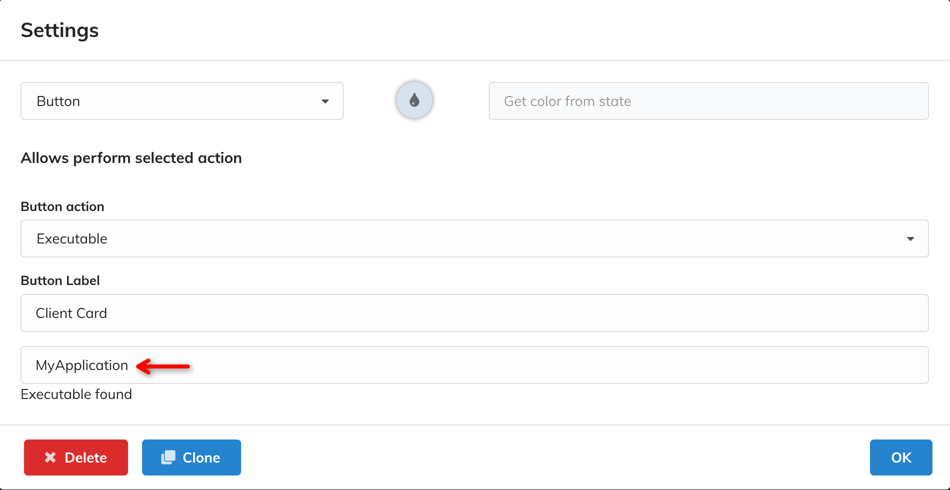
For security reasons, only predefined applications can be launched from the telephony system. Each application has a defined key that is used to create a binding in the operator application widget settings. This ensures that the operator application cannot influence which exe application is launched or what arguments are passed to it. The administrator specifies the path to the executable file and its arguments during application installation or deployment.
Example of the exe parameter configuration:
MyApplication="C:\Program Files\SomeApplication\Application.exe" /CustomerId={person.external_id}