Automatic listening to calls
Allows listening in on newcomers' calls. Calls of selected agents are automatically connected to the supervisor in listening mode.
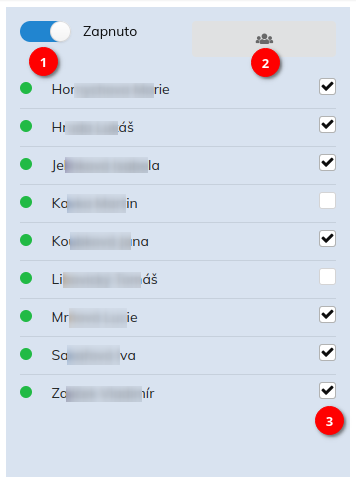
The switch ① generally turns on and off the automatic listening function. The ② button is used to select newcomers to be displayed in the widget list. Whether listening should take place for a specific agent is selected with the ③ check box.
If the function is switched on using the switch ①, then listening is activated immediately after connecting the call of the client and the agent. The supervisor can hang up the listening without affecting the ongoing client-agent call. If listening to one of the agents is in progress, a call to another agent does not start another listening session.
Supervisor must have a paired IP phone or softphone to use this function!
Settings
This widget has no settings; it is configured directly from the normal working view.