Shared data status
UCS provides universal storage called shared data that can store any JSON value. Shared data status widget allows the user to show the data stored in this storage.
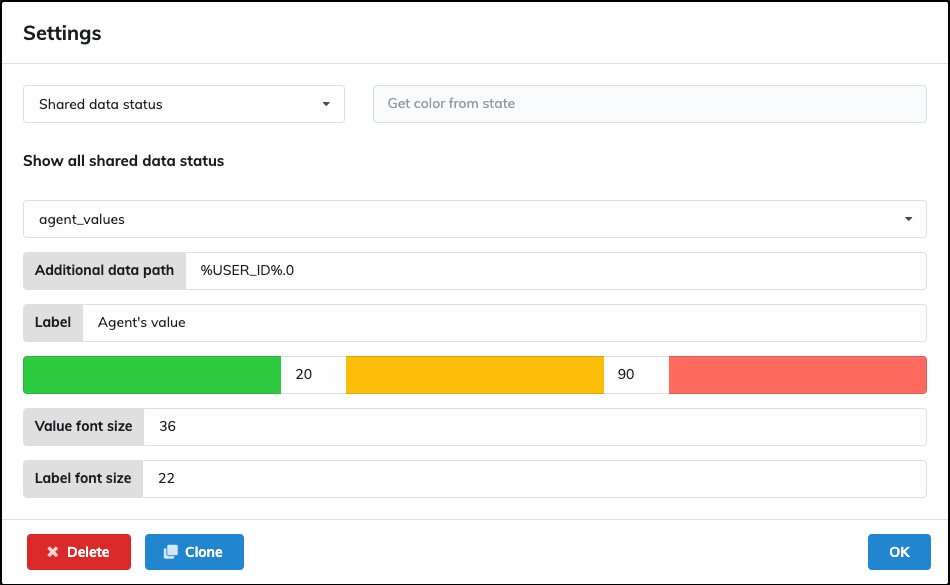
Example widget configured to show value of "agent_values" with JSON path specified as "%USER_ID%.0".

The stored JSON is:
{"14": [50, 60, 70], "20": [100, 200, 300]}
Settings
As mentioned above, the selected storage key is "agent_values".
The storage key should not contain dots because it might conflict with Additional data path.
Additional data path
Parameter is the path in JSON. The steps are divided by ..
Dynamic values can be configured to reflect logged in user. Allowed variables are:
- %USERNAME%
- %USER_ID%
Label
The text displayed under the shared data value.
Color range selection
If the value is a number, the widget can be configured to color itself according to the value.
The example is configured so that less than 20 is green, 20-90 yellow and 90 and more red.
Value font size
The size in pixels of the shared data value.
Label font size
The size in pixels of the shared data label.