Supervisorview
Overview of agents
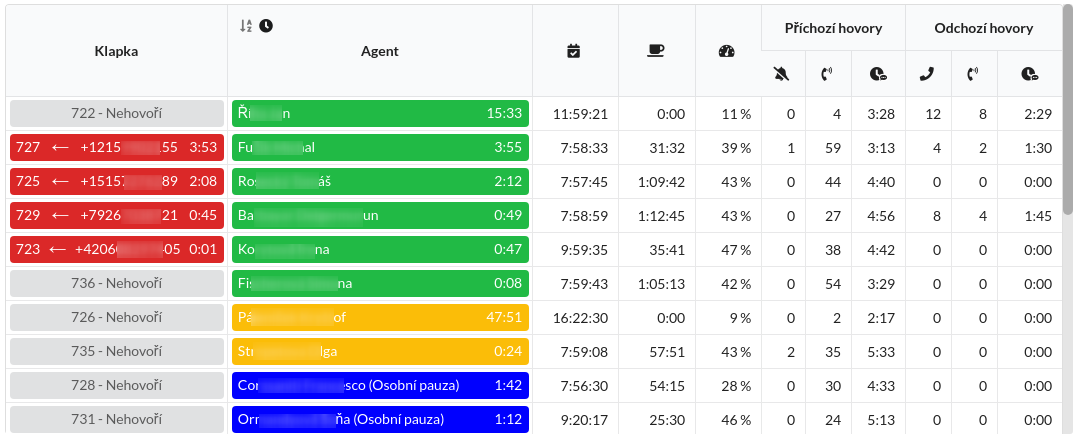
List of agents in a table with an overview of times, number of calls, etc. The list is sorted first by agent status (ready, ACW, not ready, offline) and then according to the time spent in the given state (the agent that has been ready the longest is first in the list). Click the A-Z icon in the Agent column to sort agents by their name.
Settings
Projects
Limits displayed agents and their data only according to selected projects. If no project is selected, all agents the logged-in user has permission to see are included.
Teams
Shows only agents who are members of the selected teams. If none is selected team, then all agents are displayed. If both projects and teams are selected, then the list of agents is filtered in the sense of logical "and", i.e. for the agent to appear, must be assigned one of the selected projects and be a member of one of the selected teams.
Displayed AUX reasons
List of reasons for absence that will be displayed in the table as individual ones columns. Each column contains the amount of time the agent was in that reason absences. If a time limit is set for a given reason, then when exceeded, the cell of the given agent will turn red.
Show only agents who have logged in today
Only agents that switched from the Offline status to any other state on that day will be displayed in the table. The agent appears immediately after the first switch status and will be removed from the list at the time of stat reset (midnight).
Hide offline agents
When this option is checked, agents that go Offline will be immediately removed from the overview (without waiting for the midnight reset of statistics).
Displayed columns
This option determines which columns should be displayed in the table. It is always displayed a column with the agent's name, which also displays its status.
| Title | Meaning |
|---|---|
| Extension | Paired phone, during a ringing and connected call, the number of the other party and the duration of the call. |
 | The skull icon indicates that the phone that the agent has paired with is not available and cannot receive calls (for example, the laptop connection is down or the cable from the IP phone is down). |
| First Login | The time of the first login on the given day. |
| Break time | The sum of the times of all breaks (reasons for absence marked as Break time). |
| Spoken Time | The percentage of time spoken to when the agent was Ready or in ACW. |
| Number of missed calls | The number of calls that rang on the agent's phone but the agent did not pick up the call. It may not automatically be a lost call, as the client may have been served by the next available agent. |
| Number of calls received | The number of incoming calls handled by the agent on a given day. |
| Average incoming call time | Talk Time of incoming calls divided by the number of received calls. |
| Number of outgoing picked up calls | The number of outbound calls that the agent made and connected to the client. |
| Number of outgoing calls | The number of all outgoing calls (connected and disconnected) in a given day. |
| Average outgoing call time | Talk Time of outgoing calls divided by the number of outgoing answered calls. |
| Outgoing call ringing time | Ring time of connected and unconnected outgoing calls divided by their number. |
| Total talk time | Talk Time of incoming and outgoing calls. |
| Total idle time | Total time the agent was in the AUX (not ready) state. |
| Idle to ready ratio | Percentage of time in Ready and ACW relative to all AUX (not ready) time. |
| Time in ready or ACW | Total time the agent spent in Ready or ACW, i.e. Idle time + Handle time. |
| Average wait for incoming call | Average time the agent spends Idle (is Ready but has no call). |
| Number of written e-mails | Number of newly written e-mails, e.g. as a follow-up to a phone call. |
| Number of answered e-mails | Number of replies written to incoming e-mails. |
| Average e-mail handling time | Time spent writing an e-mail. |
| Average ACW time per call | Time in ACW divided by the number of connected calls. |
Maximum length of calls
Exceeding the set time limit (in seconds) will be indicated by flashing of the cell with the agent's assigned extension.
Font size
Customizing the font size in the table according to the use of the table (eg agent view vs. wallboard display).
Columns showing values from shared data
Any number of columns can be added to display the values retrieved from external information systems. You set the shared data identifier and the column name in this summary table. The shared data then contain an associative array with UCS user IDs as keys and the data to be displayed in the column as values. E.g. user ID 1 displays the value 20% in the column, user ID 3 shows " - " and user ID 4 shows 100%. Users of other IDs are shown a blank cell:
{
   "1": "20%",
   "3": " - ",
   "4": "100%"
}